Playing Cleaver Duel on a phone or tablet
Cleaver Duel works on touchscreens. You tap to move, press an ability button to arm it, and tap again to aim. You can play the bot on your own or join a friend who is on a desktop, a phone, or a tablet.
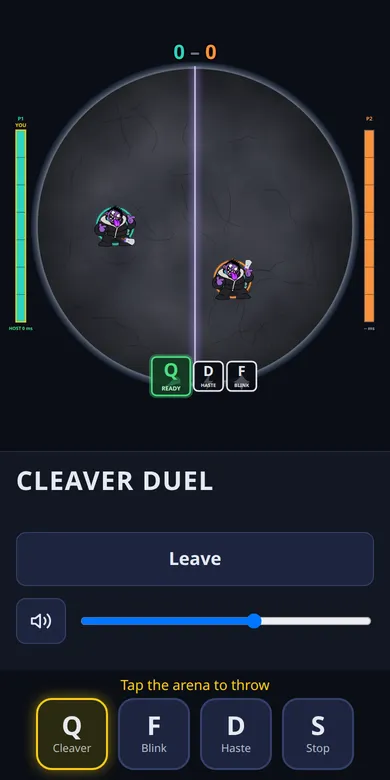
Touch controls
| Touch | What it does |
|---|---|
| Tap the arena | Move to that point. Hold and drag to keep steering. |
| Tap Q, then tap the arena | Throw a cleaver toward the second tap. The tap does not move you. |
| Tap F, then tap the arena | Blink toward the tapped point (up to 350 units). |
| Tap D | Haste, immediately. |
| Tap S | Stop, and cancel an armed ability. |
| Tap an armed button again | Cancel the aim without using the ability. |
How the two-tap aim works
Mouse players aim by pointing at the cursor when they press a key. A touchscreen has no cursor, so targeted abilities use two steps. Pressing Q or F arms the ability: the button glows yellow and a hint tells you to tap the arena. Your next tap on the arena is then used as the aim point instead of a movement command. After the ability fires, taps go back to moving you.
If an ability is on cooldown or already used, pressing its button plays a soft click and nothing is armed. The button also dims, and the Q button shows a shaded cooldown as it recharges.
Landscape and portrait
In portrait the arena fills the top of the screen with the buttons underneath. In landscape the buttons move to a column beside the arena so your thumb can reach them while the arena stays as large as possible. Both layouts work on phones and tablets.
Mobile versus desktop
A touchscreen is slower than a mouse for fine aiming, but the game is built around reading your opponent rather than clicking fast. A phone player and a desktop player can share a room; it uses the same simulation and netcode, with no special handicap. For a longer series, use the rematch button, which swaps sides.
Tips for touch players
- Arm Q while you are walking, so you are ready as soon as a good line appears.
- Keep your thumb off the arena when you do not need to move; the arena stays visible.
- Use landscape on a phone if the buttons feel cramped in portrait.
- Turn on sound: the cooldown and hit sounds are useful cues.